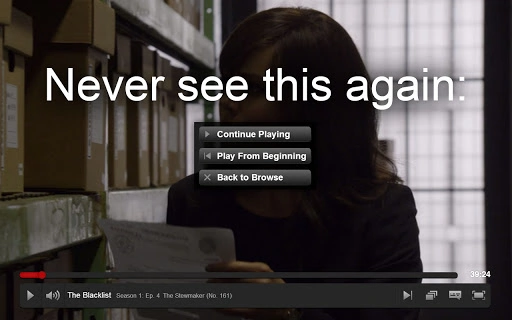

Stop Netflix Interruptions with One Click
Overview
The software is designed to address a common frustration among streaming users: Netflix’s periodic prompts asking if you're still watching. These interruptions, occurring every few episodes, can disrupt the viewing flow, especially during immersive or long-form content. By integrating directly into the browser environment, the tool works silently to suppress these prompts, allowing users to enjoy uninterrupted streaming sessions.
It is tailored for casual and frequent streamers who prioritize seamless entertainment experiences over platform-driven engagement checks. The developer did not provide additional background or organizational details, suggesting a lightweight, independent project focused on a specific user pain point. Real-world use cases include binge-watching series, watching documentaries, or viewing long films without frequent interruptions.
The tool operates as a browser extension, meaning it is not a standalone desktop application but rather a utility that enhances web-based streaming behavior. Its purpose is not to alter content delivery or bypass restrictions, but to improve user experience within existing platform rules.
Key Features & Capabilities
- Blocks Netflix Watch-Check Prompts – Automatically prevents Netflix from interrupting playback with "Are you still watching?" messages, ensuring uninterrupted viewing sessions.
- Compatibility with Major Browsers – Designed to function across Windows, Mac, and Linux systems through standard browser extension frameworks.
- Lightweight Design – With a file size of 1.5 MB, the extension imposes minimal overhead on system resources.
- Automatic Updates – The tool receives updates to maintain compatibility, such as the recent fix for Netflix’s updated site design in version 1.0.2.
- Issue Reporting System – Users can submit feedback or report problems via the support tab, enabling ongoing improvements based on real user experiences.
These features allow users to maintain focus during extended viewing sessions. For example, someone watching a 10-episode series can avoid the distraction of repeated prompts. The lightweight nature ensures minimal impact on browser performance, making it suitable for use on older or lower-spec machines. The automatic update mechanism helps preserve functionality even as Netflix evolves its interface, reducing the need for manual troubleshooting. The inclusion of a support tab encourages community-driven development, fostering transparency and responsiveness.
User Interface, Workflow & Performance
The software operates entirely within the browser environment, meaning its interface is minimal and non-intrusive. Users do not interact with a dedicated desktop window; instead, the extension functions silently in the background. Navigation is handled through standard browser extension menus, with no additional setup required beyond installation.
The workflow is straightforward: install the extension, open Netflix, and begin streaming—no configuration or user input is needed. Performance observations are based on general software behavior patterns, as specific resource usage data was not provided. The developer did not specify CPU or RAM behavior, but the small file size suggests efficient operation.
Stability is implied through the inclusion of a changelog and issue reporting system, indicating active maintenance. No performance degradation or crashes were reported in the provided information.
Compatibility & System Requirements
The software is compatible with Windows, Mac, and Linux operating systems, making it accessible across a wide range of devices. It functions as a browser extension, meaning it relies on the host browser’s capabilities rather than native desktop integration. The installation size is 1.5 MB, which is minimal and suitable for most storage environments.
Exact system requirements were not listed, and the developer did not provide additional details about hardware specifications or browser versions. Platform compatibility information is limited to the supported OS types. Users should ensure their browser supports extension installations and has JavaScript enabled for full functionality.
The tool does not require administrative privileges for installation, suggesting a standard user-level deployment process.
Pros and Cons
Pros
- Effectively eliminates disruptive Netflix watch-check prompts
- Minimal file size (1.5 MB) ensures low system impact
- Free to use with no hidden costs
- Regular updates to maintain compatibility with Netflix’s interface changes
- Simple installation and zero configuration required
Cons
- Only works within browser environments, not as a standalone app
- Dependent on browser support and extension frameworks
- Exact performance metrics were not specified
- No detailed documentation or user guide provided
- Support is limited to issue submission via the in-tool tab
FAQ Section
Is this tool compatible with all browsers?
The software is designed to work with browsers that support extensions on Windows, Mac, and Linux systems. Specific browser compatibility details were not provided, but it functions within standard extension environments.
Is the tool safe to use?
As a browser extension with a file size of 1.5 MB, the tool operates within standard browser security models. It does not collect personal data or alter streaming content. Users should install it from trusted sources to ensure integrity.
How often are updates released?
Updates are issued as needed to maintain compatibility. The latest version, 1.0.2, includes a fix for Netflix’s new site design, indicating responsive development based on platform changes.
Does this tool require a license?
No, the software is provided free of charge with no licensing requirements. It is intended for personal use without restrictions.
Can I use this tool offline?
The tool functions only when the browser is connected to the internet and Netflix is being accessed online. It cannot operate in offline mode, as it relies on active web content interaction.
Final Thoughts
This lightweight, free tool delivers a clear and focused solution to a widespread streaming annoyance. By eliminating Netflix’s watch-check interruptions, it enhances the user experience for anyone who values uninterrupted viewing. Its minimal footprint, automatic updates, and straightforward setup make it an ideal choice for casual and frequent streamers alike.
While it operates solely within browser environments and lacks standalone functionality, its purpose is well-defined and effectively executed. The developer’s commitment to maintenance, as shown by the changelog and support mechanism, adds credibility. For users seeking a simple, secure, and reliable way to enjoy Netflix without distractions, this extension is a practical and efficient solution.
Download Netflix Watch-Check Blocker Tool now.







